# YeboID integration guide for coding agents
# Integrate YeboID with your AI agent
Give your coding agent this page. It can inspect the registered app, check permissions, generate an integration and test it. You stay in control of identity verification and account consent.
## Select the existing stack first
Read [platforms](/platforms) and [sdk-manifest.json](/sdk-manifest.json) before choosing packages. Use [Swift](/swift-sdk/) for Apple apps, [Kotlin](/kotlin-sdk/) for native Android, [React Native](/react-native-sdk/) for React Native/Expo development builds, and [Python](/python-sdk/) for Python APIs or server-rendered apps. Use the existing web, Node or Flutter SDK for those stacks. Other backends can use the [OAuth contract](/other-platforms) and [OpenAPI](/openapi.json).
The CLI `init` command below generates **React + Node only**. Do not run it to replace an existing native app or Python API. The native/Python SDKs check public registration before starting sign-in. Read their repository's `AGENTS.md` and setup guide, configure native callback routing or server sessions, then run that package's checks. [llms-full.txt](/llms-full.txt) includes the integration guides as plain text.
## One setup command
1. Sign in to [Developer Apps](https://yeboid.com/developer/apps), create an app and copy its **public client ID**. Register `http://localhost:5173/auth/callback` for local web development. Keep `openid profile offline_access` for basic sign-in.
2. Ask your agent to run:
```sh
npx yeboid-node init \
--client-id YOUR_CLIENT_ID \
--redirect-uri http://localhost:5173/auth/callback \
--output my-app
cd my-app
npm install
npm run dev
```
3. Open the local app, click **Continue with YeboID**, complete your login and approve the requested permissions. After returning, click **Call protected API**. That proves the browser and API work together.
The generated project includes a React frontend, a protected Express API, public configuration, and `AGENTS.md` instructions. It refuses an existing output directory. It does not need a client secret for the browser's PKCE flow.
For an existing project, install `yeboid-web` in the frontend and `yeboid-node` in the API. Ask your agent to adapt the generated example to the existing framework instead of replacing the project.
## Copy this prompt
```text
Integrate YeboID into this app. Read https://docs.yeboid.com/llms.txt
and https://docs.yeboid.com/ai-agents/ first. Reuse the existing auth and
routing structure. My public client ID is CLIENT_ID and registered callback
is CALLBACK_URL.
Run yeboid-node doctor with --json first. Fix registration/request mismatches
explicitly; never silently drop permissions. Select the implementation from
https://docs.yeboid.com/sdk-manifest.json for this project's actual stack.
The init CLI is React + Node only. Keep secrets out of browser/native code.
Store only sub as yeboid_user_id. Show all auth/dependency failures.
Verify new login, callback, a protected API request, returning login,
denial, logout, and missing-permission recovery. Report local tests,
public package versions, deployment, and actual live login separately.
Leave human identity verification and consent to me.
```
## Check before deploying
```sh
npx yeboid-node doctor \
--client-id YOUR_CLIENT_ID \
--redirect-uri https://your-app.example/auth/callback \
--scopes openid,profile,offline_access \
--json
```
A nonzero exit means setup needs attention. The response lists `missingScopes`, `issues`, `requestedScopes` and `setupUrl`. This command reads public registration data; it cannot certify a live login, ownership of a domain, or successful KYC.
Use `--issuer https://dev-api.yeboid.com` for a client registered in the development environment. Client IDs and callbacks belong to their environment. Do not send development tokens to a production API.
## Permissions without guesswork
The API, portal and both SDKs share `openid profile offline_access` as the default. The public catalog at [`/oauth/scopes`](https://api.yeboid.com/oauth/scopes) defines supported scopes and presets. `/oauth/clients/{clientId}/configuration` returns registered callbacks and permissions without secrets or owner identity.
Every permission must be **registered → requested → consented → enforced**. Adding a permission requires new user consent. Token refresh cannot add permissions. `kyc` allows reading verification status; it does not itself require the user to be verified. `openid` identifies an account; it does not perform KYC. See [permissions](/permissions).
The browser SDK checks configuration before redirecting. It fails visibly on mismatched callbacks, missing scopes or unavailable configuration. Node's `checkIntegration()` provides the same check for startup or CI. Use the actual granted scope from a token response or introspection when deciding what is available. A frontend check never replaces server authorization.
## Production verification
Developer identity verification and domain ownership are separate from end-user consent. Before enabling public production login, complete both in Developer Apps and supply an HTTPS website and privacy policy. Native app callbacks still require PKCE; prefer verified HTTPS app links where supported.
The verification cutover is tracked in [release status](/security/release). An app registration or a passing doctor command alone is not proof that the verification gate has been deployed or that the app is approved for public login.
## Acceptance checks for every platform
1. Registration: exact callback and requested scopes match the public configuration; mismatches/outages produce an actionable error before sign-in.
2. New login and returning login: a human completes sign-in/consent, the callback reaches the host, and userinfo returns a real `sub`.
3. Refusal/cancellation, wrong callback/state and expired/consumed codes fail visibly; no fabricated user appears.
4. A product API accepts an access token for the right client and rejects ID tokens, refresh tokens, wrong audiences and insufficient scopes. Resource ownership is checked separately.
5. Refresh persists the rotated token before another call. Concurrent refresh/logout cannot revive a signed-out session. Uncertain rotation/storage failures require a new login instead of replay.
6. App sign-out revokes its refresh token and clears secure local/server storage after success. Browser SSO behavior is reported separately.
7. Test network and storage failures. Report local tests/build, public source/package access, deployment and real-device/live login as separate evidence.
Agents using the product need a human-authorized session. YeboID does not advertise client-credentials or device-code grants; do not invent machine-login endpoints or bypass human consent.
## Security boundaries for agents
- Use access tokens for API requests; never substitute an ID token.
- Keep `client_secret`, tokens and signing keys out of source control, screenshots and browser variables.
- Store only the stable `sub` as `yeboid_user_id` in your app's database. Fetch profile and KYC data from YeboID instead of copying them.
- Check resource ownership in your own API after authentication. Scopes grant capabilities, not ownership of another user's resources.
- Local JWT verification checks signature, issuer, audience, purpose and expiry. Use introspection where you need current revocation/permission state.
- Failed API requests must produce visible errors. Do not fabricate users, default verification states or successful sessions.
- See [troubleshooting](/troubleshooting) for `invalid_scope`, `insufficient_scope`, callback, PKCE and refresh errors.
## Tested browser journey
These screenshots come from a disposable synthetic account using the installed SDK tarballs, real PKCE/code exchange, the hosted consent UI and a Node API validating signed tokens. They do not certify a real person's identity or a production app's domain.
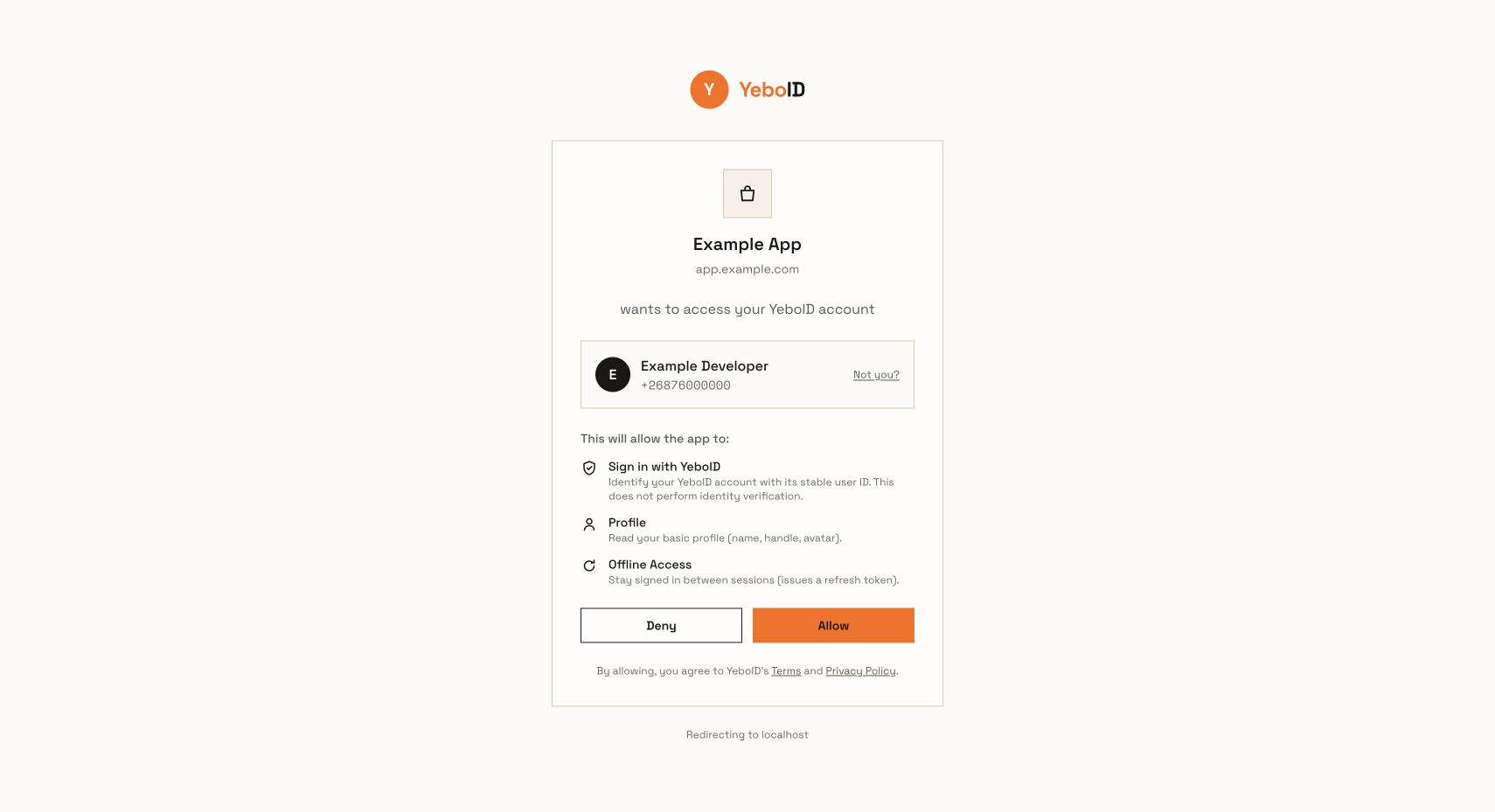
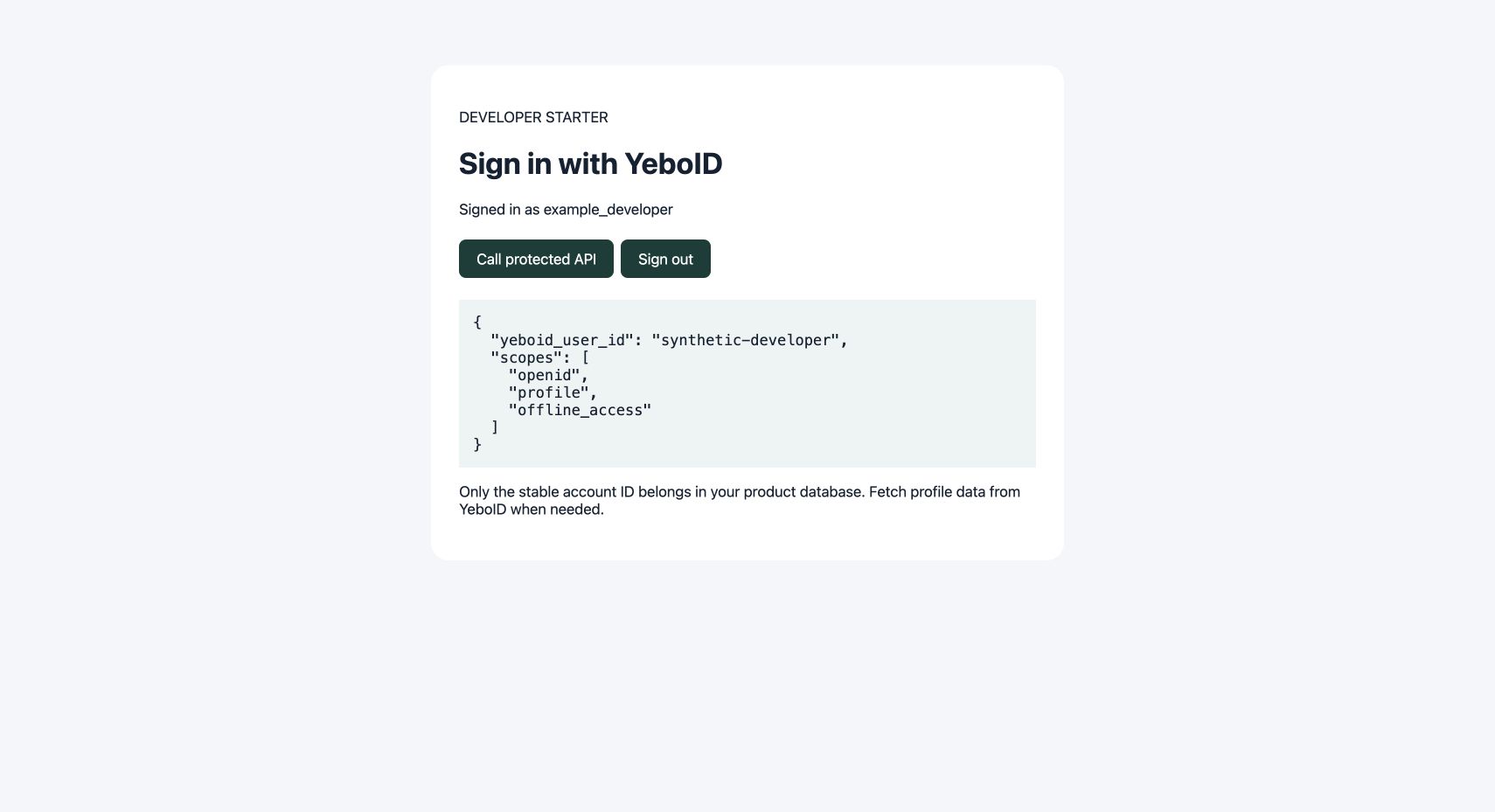
The candidate [verification walkthrough](/app-verification) covers developer KYC, exact domain proof and enabling production logins.
---
# Choose your YeboID implementation
Pick the existing application's stack before installing anything. Native apps use the system browser and secure device storage. Product APIs validate access tokens and enforce resource ownership server-side. AI coding agents can read [the SDK manifest](/sdk-manifest.json), [the full text guide](/llms-full.txt), and [the OAuth OpenAPI contract](/openapi.json).
| Stack | Implementation | Installation / distribution |
| --- | --- | --- |
| Browser, React, Vue, Svelte | [Web SDK](/web-sdk/) | Existing `yeboid-web` npm package; React is optional |
| Node.js, Express | [Node SDK](/node-sdk/) | Existing `yeboid-node` npm package; JWT middleware and setup CLI |
| Flutter, Dart | [Flutter SDK](/flutter-sdk/) | Existing `yeboid_flutter` Git dependency |
| Swift, iOS, macOS | [Swift SDK](/swift-sdk/) | Swift Package Manager source tag `0.1.0`; AuthenticationServices + Keychain |
| Kotlin, Android | [Android SDK](/kotlin-sdk/) | Gradle composite source build `0.1.1`; AppAuth + Keystore; no Maven Central release claimed |
| React Native, Expo development build | [React Native SDK](/react-native-sdk/) | Built GitHub release tarball `0.1.0`; native AppAuth + Keychain; no npm registry release claimed |
| Python, FastAPI, Flask, Django | [Python SDK](/python-sdk/) | pip Git source tag `0.1.0`; online token verification; no PyPI release claimed |
| Go, ASP.NET/C#, PHP/Laravel, Java servers | [OAuth protocol contract](/other-platforms) | Use the framework's OAuth client or the documented online-validation contract; no dedicated YeboID package yet |
The new SDK source repositories and GitHub releases are public. Swift, React Native and Python use version `0.1.0`; Kotlin uses `0.1.1`, which fixes Android CI setup. Use the exact distribution method in each guide.
The Swift, Kotlin, React Native and Python implementations are separate repositories with their own tests, agent instructions and CI. They are initial releases. Their automated checks do not prove a completed human sign-in or physical-device behavior. Existing SDK release status is tracked separately in [release evidence](/security/release).
## Choose the right setup path
- **New React + Node app:** `npx yeboid-node init` generates a starter. It does not generate other platforms.
- **Existing web app:** use `yeboid-web` without replacing its routing or UI framework. Add the Node SDK only if the backend uses Node.
- **Native Apple app:** use Swift Package Manager and register the exact custom-scheme callback. This initial SDK does not accept HTTPS/universal-link callbacks.
- **Native Android app:** use the Kotlin source package and AppAuth redirect receiver. Inspect the host's merged manifest and backup exclusions.
- **React Native:** link AppAuth and secure storage in a native host. Expo Go is unsupported; follow the native modules' Expo development-build setup.
- **Python API or server-rendered app:** use the Python package. Keep PKCE transactions/tokens in encrypted server-side sessions and coordinate refresh across workers.
- **Another backend:** use the standard protocol contract. Never install a similarly named package that the manifest does not list.
## Live capabilities and setup checks
OIDC discovery is the authoritative public endpoint catalog: [`/.well-known/openid-configuration`](https://api.yeboid.com/.well-known/openid-configuration). On 24 October 2026 it advertised authorization-code, refresh and business token exchange, S256 PKCE and the supported scopes. Authorization uses `https://yeboid.com/oauth/authorize`; token and profile calls use the API origin. Do not infer one origin from the other.
The public [`/oauth/scopes`](https://api.yeboid.com/oauth/scopes) catalog and `/oauth/clients/{clientId}/configuration` registration checks are available in the final production check on 24 October 2026. The existing demo client returned its exact native callbacks and permitted scopes. All four new SDKs validate registration before starting sign-in. API failures and permission mismatches are errors; never bypass them or fabricate a successful preflight.
YeboID does not advertise device-code or client-credentials grants. Agents may implement integrations or use a consenting person's authorized session; they cannot obtain autonomous machine identity through an unsupported grant. Leave human verification and consent to the human.
---
# yeboid-web
YeboID sign-in for browsers and React. Version 0.5.0 is available publicly on npm. PKCE, OAuth state validation, rotating refresh, single-flight retries, and visible errors are included. No client secret belongs in a browser.
```bash
npm install yeboid-web
```
## React: provider and sign-in button
```tsx
import { YeboIDProvider, YeboIDSignInButton, useYeboID } from 'yeboid-web/react';
function Account() {
const { user, isLoading, error, retry, signOut } = useYeboID();
if (isLoading) return
Loading your account…
;
if (error) return
{error.message}
;
if (!user) return ;
return
Signed in as @{user.preferred_username}
;
}
export function App() {
return ;
}
```
Register your exact callback in [Developer Apps](https://yeboid.com/developer/apps). Serve the provider on that callback and configure your SPA fallback. No API origin/endpoint overrides are needed for production. The React entry is optional; the root SDK does not depend on a React runtime.
## Framework-independent client
```ts
import { YeboIDClient } from 'yeboid-web';
const identity = new YeboIDClient({ clientId: 'YOUR_CLIENT_ID',
redirectUri: `${window.location.origin}/auth/callback`,
scope: ['openid', 'profile', 'offline_access'] });
if (YeboIDClient.isCallbackUrl(window.location)) {
const { user } = await identity.handleCallback();
window.history.replaceState({}, '', '/');
console.log(user.sub, user.preferred_username);
}
// On an explicit user action:
// await identity.signIn();
// const response = await identity.fetch('https://YOUR_TRUSTED_API.example/me');
// await identity.signOut();
```
Attach access tokens only to your own trusted API. Enforce authorization on the server with `yeboid-node`; browser state and the returned ID token are not server authorization checks.
## Permissions, errors, and business context
Start with `openid profile offline_access`. Phone, email, identity documents, and business context require their own consented scopes. `preferred_username` is the shared YeboID/Hiyebo username. Keep `sub` as the stable identity reference.
`useYeboID()` exposes `error`, `retry()`, and `resetError()`. `YeboIDSignInButton` renders sign-in failures in an alert and accepts an `onError` callback. Logout/refresh/network errors propagate; do not fabricate a successful login. The default storage is localStorage, so use a strong CSP and prevent XSS in your application. Never put client secrets in that storage.
Scope types include `business`, `business:kyc`, and `business:manage`. Business context never replaces the human subject. `IntrospectionResult` scope helpers require an active token. Public exports include the business claim types, typed errors, and storage helpers.
See [quickstart](https://docs.yeboid.com/getting-started), [permissions](https://docs.yeboid.com/permissions), [troubleshooting](https://docs.yeboid.com/troubleshooting), and [source](https://github.com/omegathesecond/yeboid-web-sdk). Publishing availability is verified separately from a successful build. MIT license.
---
# yeboid-node
YeboID sign-in for Node APIs. Version 2.0.0 is available publicly on npm, with ESM and CommonJS exports and typed Express middleware. Node.js 18+.
```bash
npm install yeboid-node
```
## Protect an API
```ts
import express from 'express';
import { YeboID, type AuthenticatedRequest } from 'yeboid-node';
const app = express();
const identity = new YeboID({ clientId: process.env.YEBOID_CLIENT_ID! });
app.get('/me', identity.authenticate(), identity.requireScopes('profile'),
async (req, res, next) => {
try {
// JWT verification gives identity + permissions. Userinfo gives consented profile claims.
const personId = (req as AuthenticatedRequest).user!.sub;
const profile = await identity.getUserInfo(req.headers.authorization!.slice(7));
res.json({ personId, username: profile.handle });
} catch (error) { next(error); }
});
app.listen(3000);
```
Only a client ID is required to validate access tokens. For a server-driven authorization flow, also provide `redirectUri` and, for a confidential client, `clientSecret`. Defaults are `https://api.yeboid.com` for issuer/API calls and `https://yeboid.com/oauth/authorize` for hosted login.
## Verify webhooks
Mount the raw-body route before `express.json()`:
```ts
app.post('/webhooks/yeboid', express.raw({ type: 'application/json' }), (req, res) => {
const valid = identity.verifyWebhook(req.body,
req.get('X-YeboID-Signature') ?? '', process.env.YEBOID_WEBHOOK_SECRET!,
req.get('X-YeboID-Timestamp') ?? '');
if (!valid) return res.sendStatus(401);
const event = JSON.parse(req.body.toString('utf8'));
// Deduplicate event.id in your database before applying event.event.
res.sendStatus(200);
});
```
Signatures are `v1=HMAC_SHA256(secret, timestamp + '.' + rawBody)`, with a five-minute replay window. Raw/legacy signature schemes are rejected.
## Authorization
`authenticate()` validates RS256, issuer, audience, expiry and access-token purpose. The API wire payload uses `scopes: string[]`; ID tokens cannot authenticate API routes. `req.user.sub` is the person; `req.user.businessId` is optional business context. `getUserInfo()` maps OIDC `preferred_username` to `handle` and `phone_number` to `phone` without inventing missing values. Never derive a username from a display name.
Use `requireScopes(...scopes)` plus your own resource ownership rules. For current revocation/role state call `introspect(token)` and check `active`, `hasScope()`/`hasAllScopes()`. An inactive result grants no permissions, even an empty requested set. Offline JWT validation alone cannot instantly observe a server-side revocation.
## Version 2 migration
- `verifyWebhook` and `verifyWebhookSignature` now require the timestamp argument and the API's `v1=` signature format.
- Access-token middleware reads YeboID's actual `type: 'access'` and `scopes` claims; signed ID tokens or malformed payloads are refused.
- Production endpoint defaults are correct; use `authUrl` separately when configuring another hosted environment.
- Do not use the legacy private `yeboid-sdk` package for new integrations.
See [the quickstart](https://docs.yeboid.com/getting-started), [permissions](https://docs.yeboid.com/permissions), and [the source](https://github.com/omegathesecond/yeboid-sdk-node). Publishing availability is verified separately from a successful build. MIT license.
---
# Flutter SDK
The YeboID Flutter SDK provides beautiful, pre-styled widgets for authentication with the Midnight Gold theme. Add "Login with Yebo" to your app in minutes.
## Installation
Add to your `pubspec.yaml`:
```yaml
dependencies:
yeboid_flutter: ^1.0.3
```
Or pin the GitHub release directly (works today, before pub.dev publish):
```yaml
dependencies:
yeboid_flutter:
git:
url: https://github.com/omegathesecond/yeboid-flutter.git
ref: v1.0.3
```
The SDK depends on `flutter_appauth '>=7.0.0 <9.0.0'`, so a consuming app may pin
either `^7.0.0` or `^8.0.0` — the range is deliberately wide so apps already on 8.x
aren't blocked.
Run:
```bash
flutter pub get
```
## Quick Start
### 1. Wrap Your App
```dart
import 'package:yeboid_flutter/yeboid_flutter.dart';
void main() {
runApp(
YeboIDProvider(
config: YeboIDConfig(
clientId: 'your-client-id',
redirectUri: 'yourapp://auth',
),
child: MaterialApp(
home: LoginScreen(),
),
),
);
}
```
### 2. Add Login Button
```dart
class LoginScreen extends StatelessWidget {
@override
Widget build(BuildContext context) {
return Scaffold(
body: Center(
child: YeboIDLoginButton(
onSuccess: (user) {
Navigator.pushReplacementNamed(context, '/home');
},
onError: (error) {
ScaffoldMessenger.of(context).showSnackBar(
SnackBar(content: Text(error)),
);
},
),
),
);
}
}
```
### 3. Show User Info
```dart
class HomeScreen extends StatelessWidget {
@override
Widget build(BuildContext context) {
return Scaffold(
body: Column(
children: [
YeboIDProfileCard(
onLogout: () {
Navigator.pushReplacementNamed(context, '/login');
},
),
],
),
);
}
}
```
## Available Widgets
| Widget | Description |
|--------|-------------|
| [YeboIDProvider](/flutter-sdk/provider) | Provider widget that wraps your app |
| [YeboIDLoginButton](/flutter-sdk/login-button) | Pre-styled "Login with Yebo" button |
| [YeboIDAvatar](/flutter-sdk/avatar) | User avatar with KYC badge |
| [YeboIDProfileCard](/flutter-sdk/profile-card) | Complete profile card |
| [YeboIDVerifyButton](/flutter-sdk/verify-button) | KYC verification button |
## Theme Colors
The SDK uses the **Midnight Gold** color palette:
| Color | Hex | Usage |
|-------|-----|-------|
| Gold Primary | `#D4AF37` | Primary accent, buttons |
| Gold Light | `#F5E6A3` | Hover states, highlights |
| Gold Dark | `#B8962E` | Gradients, pressed states |
| Dark BG | `#0A0A0F` | Background |
| Dark Surface | `#1A1A2E` | Cards, elevated surfaces |
| Verified Green | `#10B981` | KYC verified badge |
## Context Extensions
The SDK provides convenient context extensions:
```dart
// Get the YeboID client
final client = context.yeboId;
// Get the current user (null if not logged in)
final user = context.yeboIdUser;
// Check if logged in
if (context.isYeboIdLoggedIn) {
// User is authenticated
}
// Check if KYC verified
if (context.isYeboIdVerified) {
// User has passed KYC
}
```
## Dependencies
The SDK requires these packages:
```yaml
dependencies:
flutter_secure_storage: ^9.0.0
url_launcher: ^6.2.0
http: ^1.2.0
```
## Platform Setup
Your `redirectUri` **must be a custom scheme** (e.g. `yourapp://callback`) and
that scheme must be registered both on your YeboID OAuth app's `redirectUris`
**and** natively, below. (Don't use an `https://` App Link — system browsers
claim https themselves and won't reliably hand it back to your app.)
### Android
Register the redirect scheme with `flutter_appauth`'s manifest placeholder in
`android/app/build.gradle` (do **not** hand-add an intent-filter to
`MainActivity` — the SDK/`flutter_appauth` provides the `RedirectUriReceiverActivity`):
```gradle
android {
defaultConfig {
manifestPlaceholders += ['appAuthRedirectScheme': 'yourapp']
}
}
```
::: danger Do NOT set `android:taskAffinity=""` on MainActivity
`flutter_appauth`'s `AuthorizationManagementActivity` is `singleTask` with the
default task affinity (your package name). An empty/custom affinity on
`MainActivity` puts the OAuth flow in a separate task that is cleared during the
browser round-trip — login completes in the browser but never returns to the
app, and logcat shows `W/AppAuth: No stored state - unable to handle response`.
Leave `MainActivity` on the default affinity (`launchMode="singleTop"` is fine).
:::
### iOS
Add to `ios/Runner/Info.plist`:
```xml
CFBundleURLTypesCFBundleTypeRoleEditorCFBundleURLSchemesyourapp
```
## Next Steps
- [YeboIDProvider Setup](/flutter-sdk/provider)
- [Customizing the Login Button](/flutter-sdk/login-button)
- [Displaying User Avatars](/flutter-sdk/avatar)
---
# YeboID for Swift
Native iOS 13+ and macOS 10.15+ sign-in through `ASWebAuthenticationSession`, S256 PKCE, exact callback/state validation and Keychain token storage. No third-party dependencies or native client secrets. Read [package agent instructions](https://github.com/omegathesecond/yeboid-swift/blob/v0.1.0/AGENTS.md).
## Swift Package Manager
In Xcode, add `https://github.com/omegathesecond/yeboid-swift` with version `0.1.0`. Add the `YeboID` library to your app target. Or in Package.swift:
```swift
.package(url: "https://github.com/omegathesecond/yeboid-swift", from: "0.1.0")
// target dependencies: .product(name: "YeboID", package: "yeboid-swift")
```
Register `com.yourcompany.yourapp://oauth/callback` exactly in [Developer Apps](https://yeboid.com/developer/apps), then add `com.yourcompany.yourapp` in the app's URL Types (`CFBundleURLSchemes`). This SDK supports custom-scheme callbacks; it intentionally rejects HTTP/HTTPS callbacks. It does not implement tvOS device authorization or watchOS login.
## Sign in
```swift
import YeboID
import AuthenticationServices
@MainActor final class LoginCoordinator: NSObject, ASWebAuthenticationPresentationContextProviding {
let identity: YeboID
private let window: ASPresentationAnchor
init(window: ASPresentationAnchor) throws {
self.window = window
identity = try YeboID(clientID: "YOUR_PUBLIC_CLIENT_ID",
redirectURI: URL(string: "com.yourcompany.yourapp://oauth/callback")!)
}
func presentationAnchor(for session: ASWebAuthenticationSession) -> ASPresentationAnchor { window }
func signIn() async throws -> String {
_ = try await identity.signIn(presentationContext: self)
let user = try await identity.userInfo()
guard let sub = user["sub"] as? String else { throw YeboIDError("invalid_userinfo") }
return sub
}
}
```
Keep the coordinator and client alive for the app session. Show thrown errors through the app's error UI, including user cancellation, Keychain errors and offline requests. Do not replace failed login with an invented user. Discovery supplies the correct hosted login and API endpoints; do not build the login endpoint by appending to the issuer.
Defaults request `openid profile offline_access`. Add a scope only after registering it for your client and obtaining fresh user consent. `tokens.grantedScopes` reflects the token response. Fetch identity from `userInfo()`; only persist `sub` as `yeboid_user_id` in product DBs. Never authorize an API using `idToken`.
## Restore, refresh, sign out
```swift
if let tokens = try coordinator.identity.tokens() {
// Use tokens.accessToken as the Bearer token on your product API.
// If expiresAt is reached, explicitly refresh before the next request.
}
let rotated = try await coordinator.identity.refresh()
try await coordinator.identity.signOut()
```
Keychain saves the rotated token before refresh returns. Mutating operations are exclusive; overlapping operations throw `operation_in_progress` so callers cannot reuse one refresh token concurrently. Keep one instance per issuer/client; do not share the store with an extension or another process without external coordination. Refresh is never retried automatically. If rotation succeeded but transport/storage failed, require fresh sign-in instead of replaying an uncertain refresh token.
`signOut()` revokes the app's refresh token before clearing Keychain. An error preserves local state and must be shown. This does not clear the system browser's SSO cookie or blacklist access JWTs already issued. Protect your API with server-side audience/purpose/scope checks and introspection when current revocation matters.
For app-specific storage policies, implement `YeboIDTokenStore`; all persistence methods must throw on failure. The default Keychain account includes issuer/client, and access is limited to the unlocked device. Never substitute UserDefaults or plaintext storage.
```sh
swift test
```
Automated tests cover PKCE, callback validation, rotation, outage and storage errors. They do not certify real device login or app approval.
See the [platform matrix](/platforms) for distribution and verification status.
---
# YeboID for Kotlin / Android
An Android library using [AppAuth](https://github.com/openid/AppAuth-Android) Custom Tabs, S256 PKCE, persisted one-use callback transactions and Android Keystore AES-GCM storage. Android API 23+, Java 17. This produces an AAR library, not an APK. Read [package agent instructions](https://github.com/omegathesecond/yeboid-kotlin/blob/v0.1.1/AGENTS.md).
## Install from source
```sh
git clone --branch v0.1.1 https://github.com/omegathesecond/yeboid-kotlin.git
```
In your Android app's `settings.gradle.kts`, include the adjacent checkout:
```kotlin
includeBuild("../yeboid-kotlin")
```
In your app module:
```kotlin
dependencies {
implementation("com.yeboid:yeboid-android:0.1.1")
implementation("org.jetbrains.kotlinx:kotlinx-coroutines-android:1.10.2")
}
android.defaultConfig.manifestPlaceholders["appAuthRedirectScheme"] = "com.yourcompany.yourapp"
```
The composite build supplies the dependency locally; no Maven Central publication is claimed. Alternatively run `./gradlew publishToMavenLocal` in the SDK and add `mavenLocal()` to your app's repositories. Use an exact source tag for reproducibility.
Register `com.yourcompany.yourapp://oauth/callback` exactly in [Developer Apps](https://yeboid.com/developer/apps). Configure AppAuth's redirect receiver for that scheme. The app module must supply its registered scheme; inspect the host app's merged manifest before release. Never register the SDK test placeholder scheme.
## Activity sign-in
```kotlin
import android.net.Uri
import androidx.activity.result.contract.ActivityResultContracts
import androidx.lifecycle.lifecycleScope
import com.yeboid.YeboID
import kotlinx.coroutines.launch
// Fields of your Activity. Keep this client for the session; close it onDestroy.
private val identity by lazy {
YeboID(this, "YOUR_PUBLIC_CLIENT_ID", Uri.parse("com.yourcompany.yourapp://oauth/callback"))
}
private val login = registerForActivityResult(ActivityResultContracts.StartActivityForResult()) { result ->
lifecycleScope.launch {
try {
val data = result.data
if (data == null) { identity.cancelSignIn(); showAuthCancelled() }
else {
identity.completeSignIn(data)
val sub = identity.userInfo().getString("sub")
onSignedIn(sub)
}
} catch (error: Exception) { showAuthError(error) }
}
}
// In your button handler:
lifecycleScope.launch {
try { login.launch(identity.signInIntent()) }
catch (error: Exception) { identity.cancelSignIn(); showAuthError(error) }
}
```
The `showAuthCancelled`, `showAuthError` and `onSignedIn` handlers belong to your app. Connect them to the existing UI. Do not swallow exceptions. For coroutine cancellation, rethrow `CancellationException` after any required cleanup.
Defaults request `openid profile offline_access`. Pass `scopes = listOf(...)` only for permissions explicitly registered and consented. Discovery validates supported scopes, while YeboID enforces the client's registration. The granted token scope is available from `tokens().grantedScopes`. Store only `sub` as `yeboid_user_id` in your product database. Your backend must authenticate access tokens and authorize resources itself.
## Refresh and logout
```kotlin
val tokens = identity.refresh() // serialized; persists rotation before returning
// Send tokens.accessToken to your product API as Bearer.
identity.signOut() // revoke before deleting local storage
identity.close() // release AppAuth resources when the client is no longer used
```
Use one client instance per issuer/client. Calls serialize behind a mutex; never share refresh storage across independent clients/processes without external locking. No automatic refresh retries: if network/storage state after rotation is uncertain, require a new login. Revocation errors preserve the app session and propagate. Sign-out does not erase the browser's SSO cookie.
The default `AndroidKeyStore` encrypts both tokens and pending PKCE state. **Exclude its preferences from cloud and device-to-device backup** (or disable backup for the host app); Android Keystore keys do not transfer with restored preferences. The store exposes `preferencesName` for backup exclusions. Custom `SecureStore` implementations must encrypt and throw on failures. Never use plaintext SharedPreferences.
```sh
./gradlew testDebugUnitTest assembleRelease
```
CI builds the AAR and runs Robolectric protocol/storage-error tests. Actual device callbacks, browser availability and Keystore behavior still need a host-app test.
See the [platform matrix](/platforms) for distribution and verification status.
---
# YeboID for React Native
Native AppAuth sign-in for iOS/Android, with PKCE/state/nonce handling, Keychain/Keystore storage and serialized session changes. Expo requires a **development build**; Expo Go does not contain these native modules. Read [package agent instructions](https://github.com/omegathesecond/yeboid-react-native/blob/v0.1.0/AGENTS.md).
## Install the source-release artifact
```sh
npm install https://github.com/omegathesecond/yeboid-react-native/releases/download/v0.1.0/yeboid-react-native-0.1.0.tgz react-native-app-auth react-native-keychain
cd ios && pod install
```
The tarball includes built JS and TypeScript declarations. This is a GitHub release artifact; no npm registry publication is claimed. Match the native dependency versions to your host's React Native version using the [AppAuth setup guide](https://github.com/FormidableLabs/react-native-app-auth). This wrapper adds no custom native bridge.
Register `com.yourcompany.yourapp://oauth/callback` exactly in [Developer Apps](https://yeboid.com/developer/apps). Configure the iOS URL scheme + AppAuth application delegate/scene callback, Android `appAuthRedirectScheme`, and secure-storage native capabilities following the native dependencies' installation guides. Rebuild the native host after linking. PKCE does not replace native URL routing.
## Use one client instance
```typescript
import { YeboID } from 'yeboid-react-native';
export const identity = new YeboID({
clientId: 'YOUR_PUBLIC_CLIENT_ID',
redirectUrl: 'com.yourcompany.yourapp://oauth/callback',
});
async function signIn() {
try {
await identity.signIn();
const user = await identity.userInfo();
// Persist only user.sub as yeboid_user_id in the product database.
return user;
} catch (error) {
// Route this to your app's normal error UI, then propagate as appropriate.
throw error;
}
}
const tokens = await identity.tokens(); // secure restore, or null when signed out
const granted = await identity.permissions(); // fresh actual grants, from introspection
await identity.refresh(); // single-flight and durable rotation
await identity.signOut(); // revoke before secure deletion
```
Defaults request `openid profile offline_access`. Extra scopes require explicit registration and fresh consent. `permissions()` asks for current granted scopes; do not use the configured scope list to grant capabilities. Your API must verify the access token, required scopes and resource ownership. Never use an ID token as an API bearer credential.
Discovery supplies the hosted login and API endpoints. No client secret belongs in the app. Default `KeychainTokenStore` isolates sessions by issuer/client. Custom stores must encrypt and propagate failures; AsyncStorage is not suitable for tokens. Disable/exclude Android credential backups according to the host application's backup policy.
Native cancellation, discovery errors, refresh/revoke failures and persistence errors reject their promises. Show them through the existing app UI. Sign-out waits for an in-flight rotation and revokes its newly saved token; failures preserve local state. Sign-out does not clear system-browser SSO cookies. If a refresh's network/storage result is uncertain, require fresh sign-in instead of retrying the old refresh token.
```sh
npm ci --legacy-peer-deps
npm run typecheck
npm test
npm run build
npm pack
```
Tests mock native modules and network responses. A passing build is not proof of native linking or device login. Test callbacks, cancellation, returning-user login, refresh and logout on an actual configured host app.
See the [platform matrix](/platforms) for distribution and verification status.
---
# YeboID for Python
PKCE sign-in, token exchange/rotation, userinfo, revocation and **online access-token verification** for Python 3.10+. No runtime dependencies. Use with FastAPI, Flask, Django or background tools. A coding agent acts for a consenting human; it cannot bypass login or mint client-credentials tokens.
## Install from the source release
```sh
python -m pip install 'yeboid-python @ git+https://github.com/omegathesecond/yeboid-python.git@v0.1.0'
```
This is source installation, not a claim that a PyPI package exists. Read [package agent instructions](https://github.com/omegathesecond/yeboid-python/blob/v0.1.0/AGENTS.md) and [platform selection](https://docs.yeboid.com/platforms).
## Protect a Python API
```python
import os
from yeboid import YeboID, YeboIDError
identity = YeboID(
client_id=os.environ['YEBOID_CLIENT_ID'],
redirect_uri=os.environ['YEBOID_REDIRECT_URI'],
client_secret=os.environ.get('YEBOID_CLIENT_SECRET'), # server only, optional
)
# Extract the Bearer access token from the incoming request.
# Run synchronous network calls in the framework's thread pool for async routes.
claims = identity.verify_access_token(access_token, required_scopes=['openid', 'profile'])
yeboid_user_id = claims['sub']
# Now separately enforce ownership of the product resource.
```
`verify_access_token` uses YeboID introspection on each call: it checks active state, the exact client, Bearer token purpose, expiry, subject and actual granted scopes. ID tokens and opaque refresh tokens are rejected. No local JWT decoding is trusted. Your API and frontend must use the same OAuth client ID. The dependency needs network availability; propagate failures.
Catch `YeboIDError`: map `invalid_token` to HTTP 401, `insufficient_scope` to 403, and upstream/transport/malformed-response errors to your normal 5xx error channel. An upstream `invalid_client` means your server configuration failed; do not treat it as anonymous success. Never return raw upstream bodies or credentials. [FastAPI example](https://github.com/omegathesecond/yeboid-python/blob/v0.1.0/examples/fastapi_app.py).
## Server-rendered sign-in
```python
pending = identity.authorize()
# Store pending in an encrypted SERVER-SIDE session, bound to this browser.
# Redirect the browser to pending.url. Do not expose pending.verifier.
# On callback: atomically pop pending from that same server-side session FIRST.
tokens = identity.exchange(full_callback_url, pending)
user = identity.userinfo(tokens['access_token'])
```
The callback rejects mismatched state, wrong routes, duplicate parameters, denials and transactions older than ten minutes. Only save `user['sub']` as `yeboid_user_id` in the product DB. Do not store profile/phone/email/KYC copies. Do not use client-side signed cookies to hold PKCE state or tokens; encryption is required for confidential session data. Protect app session cookies with Secure, HttpOnly and appropriate SameSite/CSRF settings.
## Rotation and logout
```python
# Hold a session/distributed lock across read -> refresh -> durable write.
new_tokens = identity.refresh(stored_refresh_token)
# Atomically save new_tokens (including refresh_token) before releasing the lock.
identity.revoke(new_tokens['refresh_token'])
# Clear your server-side app session only after successful revocation.
```
Refresh does not send extra scopes and is never retried automatically. If rotation or durable storage is uncertain after an error, start a new login; do not reuse the old refresh token. Revocation is app-specific; the browser's shared YeboID SSO cookie remains.
## Registration and checks
Register the callback exactly in [Developer Apps](https://yeboid.com/developer/apps). Defaults request `openid profile offline_access`; extra scopes require explicit registration and new consent. Discovery validates supported scopes. `identity.authorize()` checks the public registration endpoint before generating a URL. You can also run `identity.check_registration()` separately. Mismatched callbacks/scopes and unavailable APIs raise errors; fix the registration explicitly instead of bypassing preflight.
```sh
python -m unittest discover -s tests -v
python -m pip wheel --no-deps . -w dist
```
Tests mock the protocol. They do not prove a real login, app approval or live token lifecycle. CI runs separately in this repository.
See the [platform matrix](/platforms) for distribution and verification status.
---
# Go, ASP.NET, PHP and other backends
There is no dedicated YeboID SDK for these languages in this release. Use an existing OAuth/OIDC client in the application's framework, or generate a wire client from [openapi.json](/openapi.json). A generated HTTP client does not implement browser-session security or API authorization for you. The [platform manifest](/sdk-manifest.json) identifies the available maintained packages.
## Sign-in contract
1. Read [OIDC discovery](https://api.yeboid.com/.well-known/openid-configuration), require the configured issuer exactly, and require HTTPS endpoints. The authorization endpoint can have a different origin than the issuer.
2. Bind a cryptographically random `state` and S256 PKCE verifier to an encrypted server-side browser session. Use an exact registered callback. Request `response_type=code` and explicit registered scopes, including `openid`. Send the browser to the discovered authorization endpoint.
3. On callback, atomically consume the pending transaction, verify the exact route, state and a short transaction lifetime, reject duplicate query parameters, and surface denial. Do not exchange a code before these checks.
4. POST a form-encoded authorization-code exchange to the discovered token endpoint. Supply `client_id`, exact `redirect_uri`, `code` and `code_verifier`; supply `client_secret` only from a confidential server environment. Do not default to HTTP Basic auth: discovery advertises `client_secret_post` and `none`.
5. Persist tokens in encrypted server-side session storage. Fetch profile claims from userinfo using the access token. Store only `sub` as `yeboid_user_id` in the product DB.
## Protect an API using current token state
Use `POST /oauth/introspect` with a form body. This works from Go's HTTP client, .NET HttpClient, PHP's HTTP client, or another framework without inventing a local JWT parser:
```http
POST /oauth/introspect HTTP/1.1
Host: api.yeboid.com
Content-Type: application/x-www-form-urlencoded
client_id=YOUR_CLIENT_ID&token=ACCESS_TOKEN&token_type_hint=access_token
```
A confidential server may also send `client_secret` in that form. Never print this request body in logs.
Accept the result only when **all** these conditions hold:
- HTTP success with a well-formed object, `active` is the boolean `true`.
- `client_id` is exactly the client used by your frontend and API.
- `token_type` is `Bearer` (case-insensitive). Active refresh-token introspection has no Bearer token type; it must not authorize an API.
- `sub` is a nonempty string and numeric `exp` is finite and in the future.
- Required scopes are present in the returned space-separated `scope` string.
Afterward, check resource ownership in the product API. Return 401 for inactive/invalid tokens, 403 for insufficient permissions, and a normal 5xx error for dependency/network/malformed-response failures. Do not treat an unavailable introspection endpoint as inactive or anonymous success. Use a bounded timeout, reject redirects, and do not automatically retry rotating-token exchanges.
For offline verification, use a maintained JWT library and the discovered JWKS. Require RS256, issuer, audience, expiry, YeboID token-purpose claim `type: access`, and the actual access-token `scopes` array. The JWT `scopes` array differs from the OAuth/introspection wire `scope` string. ID tokens must not authenticate product API calls. Offline verification cannot see revocation until expiry.
## Refresh and sign-out
Serialize the read → refresh → durable-write sequence per session across all server workers. A refresh uses `grant_type=refresh_token`, `client_id` and the current `refresh_token`; omit `scope` to avoid expanding consent. Persist the rotated refresh token before releasing the lock. If the request result or storage is uncertain, require a new login rather than replaying the old token.
Revoke the current refresh token using `/oauth/revoke`, then clear the product session only after success. This does not clear the browser SSO cookie or instantly invalidate access JWTs for offline verifiers.
See [agent acceptance checks](/ai-agents#acceptance-checks-for-every-platform) and [tokens](/authentication/tokens). Do not claim a dedicated package or a live login until its source/distribution and actual behavior have been verified.
---
# Permissions and consent
Register only the permissions your app needs, request them in the authorization redirect, and enforce them on your API. Registration is a ceiling; the user's consent is the grant. Successful authentication alone is not authorization to modify an account or access every identity field.
## Available scopes
| Scope | What it permits | What it does not permit |
| --- | --- | --- |
| `openid` | Identify the person with stable `sub` | Read phone, email, documents, or administer their account |
| `profile` | Name, shared username (`preferred_username`), avatar | Edit the profile |
| `profile:write` | Update handle, avatar, or email via `PATCH /users/me` | Change a KYC-owned name, phone, PIN, global sessions, or developer credentials |
| `phone` | Read `phone_number`, `phone_number_verified` | Change the phone number |
| `email` | Read `email`, `email_verified` when present | Treat an unverified email as verified |
| `kyc` | Verification status, country, currency | Read identity documents |
| `kyc:full` | Full consented identity verification data | Bypass account ownership or business role rules |
| `business` | List approved memberships and obtain business context | Administer a business with a business token |
| `business:kyc` | Legal identity of a business for owner/admin roles | Reveal legal data to a member-role token |
| `business:manage` | Manage a business using a person token and permitted role | Override owner-only operations |
| `offline_access` | Request a refresh credential for continued sign-in | Perform unrelated actions without permission |
`wallet` and `wallet:transact` are unsupported and rejected. YeboID manages identity; it does not implement a wallet API.
## Enforcement points
- `/oauth/userinfo` returns only claims covered by the granted scopes.
- `GET /users/me` returns only granted fields for delegated app tokens. Direct hosted sessions see their own profile.
- `PATCH /users/me` requires `profile:write` for app tokens; its response remains limited to the app's read scopes.
- `/verification/status` requires `kyc` or `kyc:full` for apps. Only `kyc:full` receives `kycData`.
- Phone/PIN changes, email verification actions, global session/connected-app administration, account deletion, OAuth app credentials, and webhook subscription administration require a direct YeboID user session. An OAuth token does not become a hosted account-management session.
- Business tokens cannot read or administer personal identity routes. Use business-scoped userinfo for the context they represent.
- Bearer authentication refuses deleted/banned users, revoked grants, and disabled OAuth apps. Dependencies failing to verify authorization return an error; they do not create an anonymous success.
## Enforce permissions in your product
```ts
app.get('/private-profile', identity.authenticate(), identity.requireScopes('profile'), handler);
```
JWT checks are local and cached. They establish validity at issuance until the token expires; they do not contact YeboID for every request. For current consent and membership on high-impact actions, call `identity.introspect(token)` and require `active`, the needed scopes, and your product's own ownership rules. Never use a browser-only permission check as your server's authorization decision.
## Revocation and errors
Return `401` for missing/invalid/expired credentials, `403` for insufficient scope or role, and a visible `5xx` error when identity verification is unavailable. `DIRECT_SESSION_REQUIRED` means the user must complete the action in the hosted YeboID account UI. See [troubleshooting](/troubleshooting).
## Setup checks for AI agents and CI
```sh
npx yeboid-node doctor --client-id YOUR_CLIENT_ID --redirect-uri YOUR_CALLBACK --json
```
New registrations and SDK defaults use `openid profile offline_access`. The browser SDK checks `/oauth/clients/{clientId}/configuration` before redirecting, and the portal reads `/oauth/scopes` for its picker. The new SDK preflight rejects unsupported and unregistered scopes before navigation for every app. The candidate server release also enforces that ceiling for raw OAuth requests, including first-party apps; check [release status](/security/release) for deployment. Permissions are never silently broadened or discarded during authorization.
The candidate server release requires `offline_access` for a refresh token. Existing server issuance behavior remains until that cutover. Without it, handle access-token expiry by signing in again. Node token responses expose optional `refreshToken` and actual `scope`; browser clients expose `getGrantedScopes()` and `hasScope()`. Configured scopes express what the app asks for, not what a user granted.
Changing registration cannot edit an already signed JWT. In the candidate server release, YeboID API authentication, userinfo and introspection intersect its scopes with the current grant and app registration. External APIs validating JWTs locally observe revocation/removal at token expiry; use introspection for sensitive operations requiring current state.
Adding scopes means updating both app registration and SDK configuration, then starting sign-in again so the user can consent. A refresh request must stay within existing consent. This follows [OAuth refresh rules](https://www.rfc-editor.org/rfc/rfc6749#section-6) and the [OIDC offline-access consent requirement](https://openid.net/specs/openid-connect-core-1_0.html#OfflineAccess).
---
# Token management
| Token | Purpose | Default lifetime |
|---|---|---|
| Access JWT | Authorize API requests | 15 minutes |
| Opaque refresh token | Rotate the token set | 60 days |
| ID JWT | Describe the authenticated person to the client | 1 hour |
Use the token response's `expires_in` as authoritative. Operators can configure access and refresh lifetimes.
## Access tokens and claims
Send `Authorization: Bearer ACCESS_TOKEN`. YeboID signs access tokens using RS256. OAuth access JWTs carry `iss`, `sub`, `aud` (your public client ID), `exp`, `iat`, `type: "access"`, `appId`, and `scopes: string[]`. Business tokens also carry `business_id` and `business_role`; `sub` remains the person.
The OAuth token response and introspection response use a space-separated `scope` string. That wire field is different from the access JWT's `scopes` array. Use the [Node SDK](/node-sdk/) to avoid implementing the distinction yourself.
An ID token is for the client that initiated login. Never accept it as an API bearer token. Validate its signature, issuer, audience, expiry, and the `nonce` from your authorization request before trusting identity claims. The browser SDK uses the access token and userinfo for the session profile.
## Rotation and concurrency
```bash
curl https://api.yeboid.com/oauth/token \
-H 'Content-Type: application/x-www-form-urlencoded' \
--data-urlencode grant_type=refresh_token \
--data-urlencode client_id=YOUR_CLIENT_ID \
--data-urlencode refresh_token=YOUR_REFRESH_TOKEN
```
Persist the returned refresh token before sending another refresh. Serialize refresh calls: tokens are single use, and replaying an already revoked refresh token triggers revocation of that user's outstanding refresh tokens. The browser SDK shares one in-flight refresh within a client instance and protects against stale session results. Coordinate separately across tabs or server workers.
An optional `scope` narrows permissions; it cannot add permissions beyond the active consent grant. Revoked consent, a disabled account, or lost business access prevents renewal. Authorization codes are also single use and bound to the exact client, redirect URI, and PKCE verifier.
## Browser storage
The browser SDK defaults to localStorage so a login redirect and subsequent visits can restore the session. JavaScript executing on your origin can read it: prevent XSS, use a restrictive Content Security Policy, and avoid untrusted scripts. Storage write failures propagate instead of pretending tokens were saved. You may provide the SDK's `Storage` interface; memory-only storage does not survive a full-page PKCE redirect by itself.
For applications requiring tokens inaccessible to browser JavaScript, implement a backend-for-frontend using the Node SDK. Keep tokens on your server and give the browser a Secure, HttpOnly, SameSite session cookie, with CSRF protection appropriate to your routes. A browser `Storage` adapter cannot itself read an HttpOnly cookie.
Native applications should use their platform's secure credential storage. Never embed a client secret in a browser or mobile bundle. Store server secrets in a secret manager and exclude tokens from logs, analytics, error reports, and URLs.
## Backend verification and live permissions
```ts
import { YeboID } from 'yeboid-node';
const identity = new YeboID({ clientId: process.env.YEBOID_CLIENT_ID! });
app.get('/profile', identity.authenticate(), identity.requireScopes('profile'), handler);
```
The middleware verifies RS256, the configured issuer and audience, expiry, required claims, access-token purpose, and scope shape. It caches public JWKS keys locally. It cannot see a new ban or revoked grant from an offline JWT check alone. For sensitive actions, call `identity.introspect(token)` and require `active`, then enforce your own ownership/role checks. The identity API rechecks current account and consent state on protected requests. See the [permission matrix](/permissions).
## Logout and revocation
Use the browser SDK's `signOut()` or submit `token` (the refresh token) and `client_id` to `/oauth/revoke`. If you supply a client secret, it is validated. An unknown token or a token belonging to another client returns 200 without a mutation. A 200 response does not mean an arbitrary access JWT was blacklisted: offline verifiers can continue accepting an already-issued JWT until expiry. Disconnecting the app revokes its consent grant, and introspection/userinfo observe that immediately.
Clear local application sessions after successful sign-out, and display failures so the user knows when server logout did not finish. Disconnecting an app and signing out of YeboID's hosted SSO session are distinct actions.
---
# Troubleshooting sign-in
| Symptom | Check and next action |
| --- | --- |
| `invalid_redirect_uri` | Register the callback exactly, including path, port, trailing slash, and scheme. Web callbacks need HTTPS; loopback HTTP is allowed for local development. Fragments and embedded credentials are rejected. |
| Callback returns 404 | Configure an SPA fallback or add the callback route to your server. Mount the React provider on that route. |
| `invalid_state` or missing verifier | Start with `signIn()` in the same browser storage context. Do not manually construct a callback or reuse a previous authorization code. |
| API returns 401 after login | Send the access token, not the ID token. Check `YEBOID_CLIENT_ID` matches the token's audience and the issuer is `https://api.yeboid.com`. |
| API returns `insufficient_scope` | Allow the scope in Developer Apps, request it during sign-in, then obtain a new consent grant. Do not invent a permission client-side. |
| `DIRECT_SESSION_REQUIRED` | Open the YeboID account UI for credential, global-session, developer-app, or webhook administration. |
| No phone/email in userinfo | The matching scope was not granted or the profile field is absent. Do not substitute invented data. |
| `email_verified` is false | The user must verify their address in YeboID. `requireVerifiedEmail` is a UX gate; enforce verification on your backend too. |
| Third-party cookies blocked | Browsers may restrict cross-site SSO cookies. Keep the application session and global identity session distinct; display logout failures and offer retry. |
| 429 | Respect `Retry-After` and the SDK's single-flight refresh. Avoid retry loops across tabs. |
| Webhook signature fails | Use the raw request bytes, `X-YeboID-Signature`, and `X-YeboID-Timestamp`. Node 2 requires all four verifier arguments. Parsing/re-serializing JSON changes signed bytes. |
| Package install fails with 404 | Confirm the [release status](/security/release); a prepared tarball is not proof the public npm version has been published. |
## Error handling in React
`useYeboID()` exposes `error`, `retry()`, and `resetError()`. Render failures using your normal error UI. The provided `YeboIDSignInButton` also displays failed sign-in redirects. Catch rejected sign-out promises instead of showing a successful logout while server credentials remain active.
## Report a security issue
Use a private report to the repository owner rather than publishing credentials, personal data, or an exploit against live accounts. Include the package/version, affected endpoint, expected permission, and a reproduction using synthetic local fixtures. Never include an access token, refresh token, client secret, OTP, identity document, or npm token.